


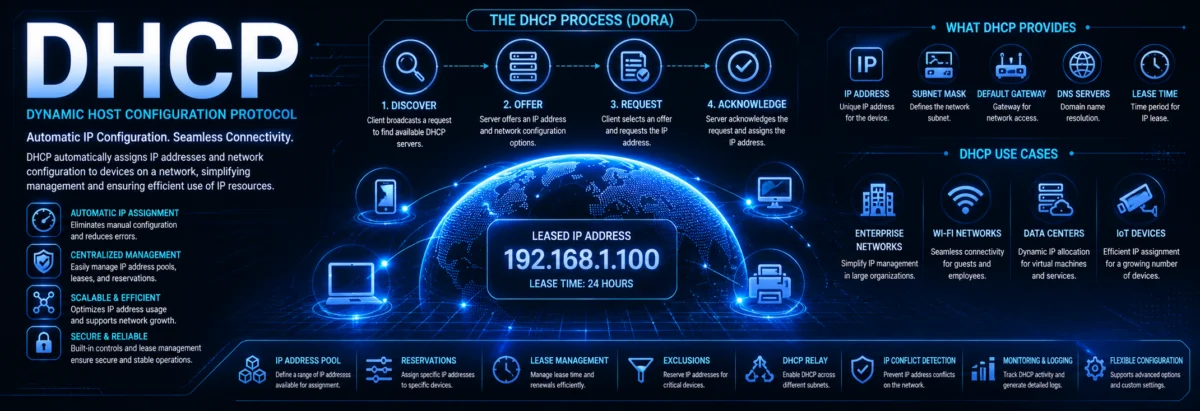
DHCP (Dynamic Host Configuration Protocol)
DHCP (Dynamic Host Configuration Protocol)
1. What Problem DHCP Solves
Before DHCP, networks used manual IP configuration.
That creates real problems:
- Human error (duplicate IPs)
- Poor scalability
- High operational cost
DHCP solves this:
Automatically assigning IP configuration to devices when they join a network.
2. What DHCP Provides
A DHCP server doesn’t just give an IP address. It provides a complete network configuration:
- IP address
- Subnet mask
- Default gateway
- DNS servers
- Lease duration
3. Where DHCP Lives (Protocol Stack)
DHCP operates at the Application Layer, but uses:
- UDP protocol
- Port 67 → Server
- Port 68 → Client
It relies on:
- Broadcast communication (initially)
4. DHCP Operation — The DORA Process
This is fundamental. You must know this cold.
Step-by-step:
- Discover (Client → Broadcast)
- Offer (Server → Client)
- Request (Client → Server)
- Acknowledge (ACK) (Server → Client)
Visual Flow


Breakdown
1. DHCP Discover
- Client has no IP yet
- Sends broadcast:
0.0.0.0 → 255.255.255.255
2. DHCP Offer
- Server proposes:
- IP address
- Configuration
3. DHCP Request
- Client selects one offer
- Broadcasts acceptance
4. DHCP ACK
- Server confirms lease
- Client configures interface
5. DHCP Lease Concept
DHCP does not assign IPs permanently.
Lease = temporary ownership
Example:
- Lease time: 24 hours
Renewal Process:
- At 50% → client tries renewal
- At 87.5% → tries again (rebind)
6. DHCP Message Types
Important for deep understanding:
- DISCOVER
- OFFER
- REQUEST
- ACK
- NAK (negative acknowledgment)
- RELEASE
- INFORM
7. DHCP Packet Structure (Key Fields)
DHCP is based on BOOTP.
Important fields:
- Transaction ID (matches request/response)
- Client MAC address
- Your IP (yiaddr)
- Server IP (siaddr)
- Options field (most important part)
8. DHCP Options (Critical in Real Networks)
Options define behavior.
Examples:
| Option | Purpose |
|---|---|
| 1 | Subnet mask |
| 3 | Default gateway |
| 6 | DNS server |
| 51 | Lease time |
| 54 | DHCP server ID |
9. DHCP Server — Core Components
A DHCP server manages:
1. Scope (IP Pool)
Example:
192.168.1.100 – 192.168.1.200
2. Exclusions
Reserved addresses (e.g., routers, servers)
3. Reservations
Bind IP to MAC address
10. DHCP Relay (Very Important in Real Networks)
Problem:
DHCP uses broadcast → routers don’t forward broadcasts
Solution:
- DHCP Relay Agent
It forwards requests to a DHCP server in another network.
Concept Visualization


11. DHCP in IPv6 (DHCPv6)
IPv6 changes the model.
Two main approaches:
1. SLAAC (Stateless)
- No DHCP needed for IP
- Router assigns prefix
2. DHCPv6
- Provides:
- DNS
- additional config
Modes:
- Stateless DHCPv6
- Stateful DHCPv6
12. Security Issues in DHCP
DHCP is inherently unauthenticated.
Common Attacks:
1. Rogue DHCP Server
Attacker gives wrong gateway → traffic interception
2. DHCP Starvation
Flood server → exhaust IP pool
Mitigation:
- DHCP Snooping (switch feature)
- Port security
- Network segmentation
13. Real-World Deployment
Typical architecture:
- DHCP Server (Windows/Linux/router)
- VLAN-based scopes
- Relay agents on routers
Example:
- VLAN 10 → 192.168.10.0/24
- VLAN 20 → 192.168.20.0/24
Each with its own scope
14. Practical Implementation Examples
Windows Server DHCP
- GUI-based
- Integrated with Active Directory
Linux DHCP (ISC DHCP / Kea)
- Config file-based
- Highly customizable
Router-based DHCP
15. Key Engineering Insights
If you want to think like a pro:
- DHCP is state management, not just IP assignment
- Lease tuning affects network performance
- DHCP + DNS integration is critical
- Relay design determines scalability
16. Common Mistakes
- Overlapping scopes
- Too short lease times
- No DHCP redundancy
- Ignoring security (rogue servers)
17. Final Summary
DHCP is:
- A dynamic configuration protocol
- Built on UDP and broadcast discovery
- Driven by the DORA process
- Essential for scalable network management
Without DHCP:
Modern networks simply don’t scale.
Frequently Asked Questions
Why does DHCP use broadcast at the beginning instead of sending the request directly to a server?
At the start, the client usually has no valid IP address, subnet information, or even knowledge of the DHCP server’s location. Broadcast lets it reach any DHCP server on the local network segment. Once communication begins, the exchange can proceed based on the server’s response and the client’s selected offer.
What is the practical difference between a DHCP reservation and a static IP address?
A reservation is still managed by DHCP, but it always assigns the same IP to a specific MAC address. A static IP is manually configured on the device itself. Reservations reduce conflicts and centralize administration, while static IPs can be useful for devices that must keep an address even if DHCP is unavailable.
Why do routers need a DHCP relay agent in multi-network environments?
DHCP discovery starts as a broadcast, and broadcasts normally do not cross router boundaries. In a routed network, clients in one VLAN cannot directly reach a server in another VLAN by broadcast. A relay agent receives the broadcast, converts it into a unicast request, and forwards it to the proper DHCP server.
What happens if a client receives multiple DHCP offers during DORA?
That is normal on networks with more than one DHCP server. The client evaluates the offers and chooses one, then sends a DHCP Request to confirm the selected offer. The other servers see that their offers were not accepted and can return the addresses to the pool after a timeout.
Why is DHCP considered a state management system rather than just an IP assignment tool?
Because the server tracks leases, renewals, expirations, reservations, exclusions, and client identities over time. It is continuously managing who owns which address, for how long, and under what options. This ongoing state tracking is what makes DHCP scalable and reliable in real networks.