


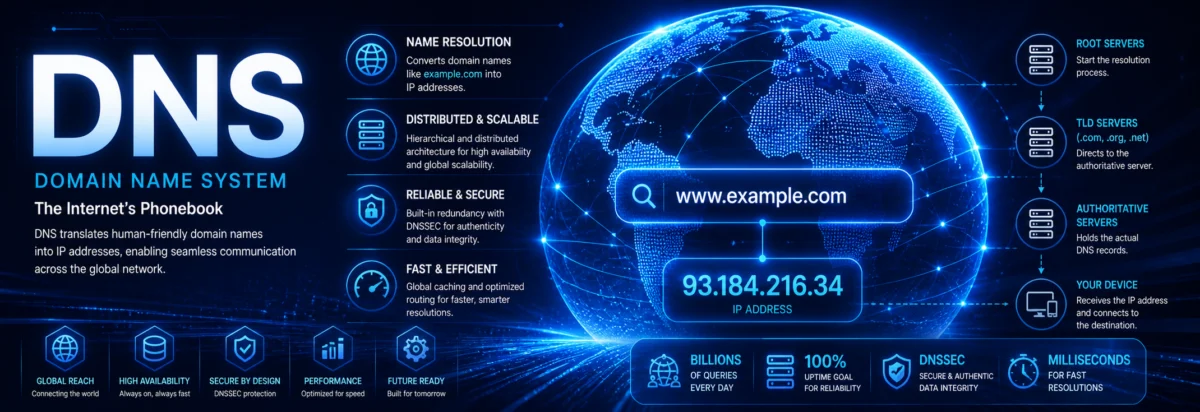
DNS (Domain Name System)
DNS (Domain Name System)
1. The Core Problem DNS Solves
Humans use:
google.com
142.250.74.14
DNS exists to bridge that gap:
Translate human-readable names into IP addresses (and more).
But that’s only the surface.
DNS is actually:
- A distributed database
- A hierarchical naming system
- A critical control plane of the internet
2. DNS Architecture — Hierarchical Design
DNS is not centralized. It is hierarchical and distributed.
Structure:
. (root)
├── com
│   ├── google.com
│   └── example.com
├── org
└── net
Visual Hierarchy


Levels Explained
- Root servers
- TLD servers (.com, .org, .net)
- Authoritative servers (domain owners)
Example organizations involved:
- ICANN
- Verisign
3. DNS Resolution — How a Query Actually Works
This is the most important part.
Two types of queries:
- Recursive
- Iterative
Step-by-step resolution
Client asks: example.com
- Client → Resolver (recursive)
- Resolver → Root server
- Root → TLD server (.com)
- TLD → Authoritative server
- Authoritative → returns IP
- Resolver → client
Visual Flow


4. DNS Components
1. Stub Resolver
- On your device
- Sends queries
2. Recursive Resolver
- Usually ISP or public service
- Does full lookup
Examples:
- Google Public DNS
- Cloudflare DNS
3. Authoritative Name Server
- Holds actual domain records
5. DNS Records (Core Knowledge)
DNS is not just A records.
Most important types:
| Record | Purpose |
|---|---|
| A | IPv4 address |
| AAAA | IPv6 address |
| CNAME | Alias |
| MX | Mail server |
| NS | Name server |
| TXT | Arbitrary data (SPF, verification) |
| PTR | Reverse lookup |
Example
example.com → A → 93.184.216.34
6. Forward vs Reverse DNS
Forward DNS
domain → IP
Reverse DNS
IP → domain
Uses special domain:
in-addr.arpa(IPv4)ip6.arpa(IPv6)
7. DNS Transport Protocol
DNS uses:
- UDP port 53 (default, fast)
- TCP port 53 (fallback, large responses)
8. Caching — Performance Backbone
DNS relies heavily on caching.
TTL (Time To Live)
Example:
TTL = 3600 seconds
Benefits:
- Reduces latency
- Reduces load
9. DNS Zones and Delegation
A zone is a portion of the DNS namespace.
Zone file contains:
- Records
- SOA (Start of Authority)
Delegation Example
.comdelegatesexample.com- Authoritative server manages it
10. DNS Load Balancing
DNS can distribute traffic:
example.com → multiple IPs
Used for:
- Load balancing
- Geo-routing
11. DNS Security
DNS was originally not secure.
Problems:
- Cache poisoning
- Spoofing
Solution: DNSSEC
Adds:
- Authentication
- Integrity
But:
- Not encryption
12. Modern DNS Enhancements
DNS over HTTPS (DoH)
- Encrypts DNS queries over HTTPS
DNS over TLS (DoT)
- Secure DNS channel
13. Real-World DNS Infrastructure
Large-scale systems use:
- Anycast routing
- Distributed global servers
- Redundant authoritative clusters
Example providers:
- Amazon Route 53
- Cloudflare
14. DNS and CDN (Critical Insight)
DNS is used for:
- Traffic steering
- Performance optimization
Example:
- User in Europe → European server
- User in Asia → Asian server
15. Common DNS Failures
You need to recognize these:
- Misconfigured NS records
- Wrong TTL values
- Cache inconsistency
- Propagation delays
16. DNS Propagation (Reality vs Myth)
DNS doesn’t “propagate” — caches expire.
Delay depends on:
- TTL
- Resolver behavior
17. Key Engineering Insights
If you want to operate at a high level:
- DNS is a distributed database, not just a lookup tool
- Caching strategy is critical
- DNS is part of your security surface
- Many outages are actually DNS failures
18. Final Summary
DNS is:
- A hierarchical, distributed naming system
- Responsible for translating names into IPs
- Built on recursive resolution and caching
- Essential to every internet service
Without DNS:
The internet is unusable for humans.
Frequently Asked Questions
What is the difference between a recursive and an iterative DNS query?
In a recursive query, the resolver is expected to return the final answer or an error on behalf of the client. In an iterative query, each DNS server gives the best information it has, usually a referral to the next server. End users almost always rely on recursive resolution through their local or public resolver.
Why does DNS use UDP by default if it can fall back to TCP?
DNS prefers UDP because it is faster and has less overhead, which matters for the huge volume of lookups performed every day. TCP is used when responses are too large for UDP, or when reliability is more important. This balance keeps DNS efficient while still handling complex or oversized replies.
Does DNSSEC protect DNS traffic from being read by others?
No. DNSSEC adds authenticity and integrity, meaning it helps verify that DNS data was not altered and really came from the expected source. It does not encrypt the query or response content. If you need privacy, technologies like DNS over HTTPS or DNS over TLS are used instead.
Why do people say DNS does not really ‘propagate’ after a change?
Because DNS changes are usually visible once cached records expire, not because information is slowly spreading across the internet like a broadcast. The delay depends mainly on TTL values and how resolvers cache data. Some users may see the new record quickly, while others keep seeing the old one until their cache expires.
What is the practical use of reverse DNS if forward DNS already gives the IP?
Reverse DNS is mainly used for verification and trust decisions, not for everyday browsing. Mail servers, logs, security tools, and network diagnostics often check whether an IP maps back to a sensible domain name. It is especially useful for identifying systems and validating infrastructure behavior.

